| Author |
Message |
 DickExpert Member DickExpert Member
Posts: 5780
Joined: 21 Sep 2006
Location: Rialto, CA.
|
|
 Posted: Mon Dec 04, 2006 12:06 pm Posted: Mon Dec 04, 2006 12:06 pm |
 |
|

trying something new...
Dick
later...
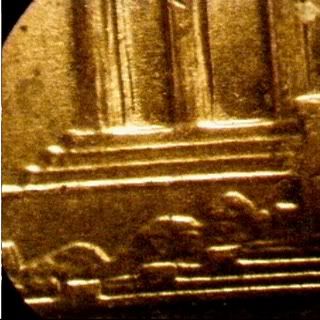
Don't know if this is any better. Thru the scope,
Dick
_________________
" Deja Moo: The feeling that you've heard this bull before".
Last edited by Dick on Wed Dec 06, 2006 1:50 am; edited 2 times in total
|
|
|
|
|
 |
 StevenExpert Member StevenExpert Member
Posts: 1298
Joined: 30 Nov 2005
Location: S/E Missouri
|
|
| Posted: Mon Dec 04, 2006 12:17 pm |
|
|
The straight on shot looks good now you need to constrain the proportions of the photo. It looks shortened. Did you use a photo shop program to do this?
Steven
|
|
|
|
|
|
DickExpert Member
Posts: 5780
Joined: 21 Sep 2006
Location: Rialto, CA.
|
|
| Posted: Mon Dec 04, 2006 12:33 pm |
|
|
I use Photo and fax viewer, but loo limited. I tried the Photo Suite IIISE, but same problem, too limited. I have an old version of Photo Shop, but I can't figure out how to use it. Everything gets "wiped out", and I have to replace the photo from My Documents, etc.
_________________
" Deja Moo: The feeling that you've heard this bull before".
|
|
|
|
|
|
DickExpert Member
Posts: 5780
Joined: 21 Sep 2006
Location: Rialto, CA.
|
|
| Posted: Wed Dec 06, 2006 1:54 am |
|
|
Steven, I finally got a, nearly, square one! Check my last, edited...
Dick
_________________
" Deja Moo: The feeling that you've heard this bull before".
|
|
|
|
|
|
StevenExpert Member
Posts: 1298
Joined: 30 Nov 2005
Location: S/E Missouri
|
|
| Posted: Wed Dec 06, 2006 5:06 am |
|
|
Great job. Looking good.
Steven
|
|
|
|
|
|
 coopExpert Member coopExpert Member
Posts: 3402
Joined: 17 Sep 2003
Location: Arizona
|
|
| Posted: Wed Dec 06, 2006 10:43 am |
|
|
Dick: With the Photoshop program, after you edit an image you need to save it to one of your drives, lets say: Save to "my Documents" then choose save to "My Pictures." Or you could save it to a floppy disk or a CD burner drive. You can choose this before giving the image a file name. If you don't do this, yes they are wiped out after you close the program. Try this and see if it ihelps in photoshop or other programs to get your image saved. (You may already found this as the post was made a while back.)
_________________
Richard S. Cooper
You may be only one person in the world, but you may also be the world to one person.
|
|
|
|
|
|
DickExpert Member
Posts: 5780
Joined: 21 Sep 2006
Location: Rialto, CA.
|
|
| Posted: Wed Dec 06, 2006 1:56 pm |
|
|
Coop, I save everything to "My Documents"! I think that is why this thing is so slow! I am going to have to strip it down to ZERO, and start over. I am also going to have to find out what I did to get the last post, "almost square"!
Dick
_________________
" Deja Moo: The feeling that you've heard this bull before".
|
|
|
|
|
|
coopExpert Member
Posts: 3402
Joined: 17 Sep 2003
Location: Arizona
|
|
| Posted: Wed Dec 06, 2006 3:55 pm |
|
|
Dick: On Photoshop when you use the marquee tool and hold down the shift button on your keyboard, you get a perfect square or circle (another choice when you hold down on the marquee button on the toolbar). Or bu adjusting the constrai button you can make it a square, but the image can be distorted if to much you change the numbers too far.
_________________
Richard S. Cooper
You may be only one person in the world, but you may also be the world to one person.
|
|
|
|
|
|
DickExpert Member
Posts: 5780
Joined: 21 Sep 2006
Location: Rialto, CA.
|
|
| Posted: Wed Dec 06, 2006 4:24 pm |
|
|
Thanks, Coop, I'll try to remember...
Dick
_________________
" Deja Moo: The feeling that you've heard this bull before".
|
|
|
|
|
|
|



