posting pictures
|
  |
| Author |
Message |
 MorgansRmineAdvanced Member MorgansRmineAdvanced Member
Posts: 132
Joined: 12 Apr 2009
Location: Raleigh, North Carolina
|
|
 Posted: Sun Apr 12, 2009 5:28 pm Posted: Sun Apr 12, 2009 5:28 pm |
 |
|
|
Need someone with lots of patience. It has become obvious to me this is going to be a slow process. Opened a photobucket account and entered pictures. Now how do I get them to appear on a post ? I've read some of the posts here and nothing seems to help.
|
|
|
|
|
 |
 fiddle-fartVeteran Member fiddle-fartVeteran Member
Posts: 479
Joined: 27 Jul 2008
Location: Charlestown, Indiana
|
|
| Posted: Sun Apr 12, 2009 5:52 pm |
|
|
welcome to the forum.
When you upload pictures to photo bucket, I found it easier to open a post here( or where ever you want to post a pic).
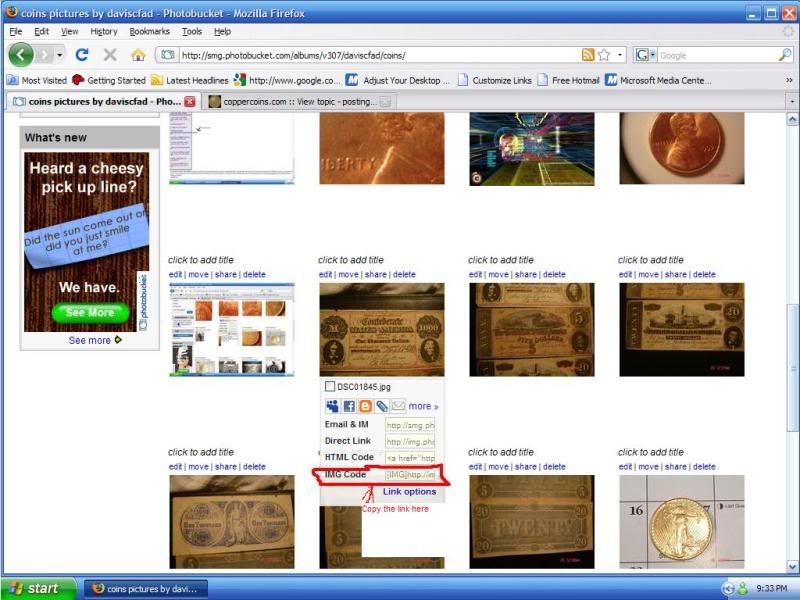
Going back to photo bucket, put your cursor over the pic thet you want to post in a forum. A info section will appear under the pic. I use the last one(4th line) Highlight the url, right click, copy, go back to the forum, left click, a cursor point will appear( flashing solid line) right click, paste... finish what you need to say( not necessarily in that order) and hit submit.( or you can preview it if you want to check spelling ) .
once again welcome to the forum
Alot of very good and smart people here
Mike
_________________
Only 1% control the wealth
so that makes me a 99%
|
|
|
|
|
|
 eagamesExpert Member eagamesExpert Member
Posts: 3013
Joined: 15 Nov 2005
|
|
| Posted: Sun Apr 12, 2009 6:17 pm |
|
|
Welcome aboard 
What Mike said.
The only thing I'd add is when you do it paste the link into your post then click "preview". That way you can see if your link worked or use trial and error to figure it out. When it works click "submit".
When you do it like Mike said then you don't need to click Img or URL.... just paste that bottom link from photobucket and it should work.
_________________
Ed
|
|
|
|
|
|
MorgansRmineAdvanced Member
Posts: 132
Joined: 12 Apr 2009
Location: Raleigh, North Carolina
|
|
| Posted: Sun Apr 12, 2009 6:31 pm |
|
|
|
Hang with me fellas. When I go to photobucket and place the cursor on the picture all I get is a hand , left click and the picture enlarges. Put the cursor on that picture and all I'm doing is looking at a picture with a cursor on it. I don't seem to get any information popping up under it. What next.
|
|
|
|
|
|
daviscfadAdvanced Member
Posts: 122
Joined: 09 Feb 2009
Location: RR, NC
|
|
| Posted: Sun Apr 12, 2009 7:38 pm |
|
|
check out my picture maybe it will help. look at the second row of pictures in my picture. if you place the mouse on the picture whats circled in red should appear under it. hope this helps
_________________
inquiring minds want to know
|
|
|
|
|
|
 DickExpert Member DickExpert Member
Posts: 5780
Joined: 21 Sep 2006
Location: Rialto, CA.
|
|
| Posted: Sun Apr 12, 2009 7:41 pm |
|
|
morgansrmine, welcome aboard!
I see you are a "bucket fan.
I'll tell you how I do it, and then you have a choice.
I decide which image(s) I want to post, and hover the scrift above the image. that outs some more below, and a little box in the top left corner. Check that box, and select the second, image, and do the same. When you have all you need, go to the right edge, and down to a blue bar that saya: generate an image, etc. That will give you a page with a bunch of choices. For posting on a msg board click the line with the selections and it will highlight. Right click and select copy. You are rteadty to post. Go to the forum, and post where they are supposed to go.
Dick
_________________
" Deja Moo: The feeling that you've heard this bull before".
|
|
|
|
|
|
DickExpert Member
Posts: 5780
Joined: 21 Sep 2006
Location: Rialto, CA.
|
|
| Posted: Sun Apr 12, 2009 7:47 pm |
|
|
morgansrmine, welcome aboard!
I see you are a "bucket fan.
I'll tell you how I do it, and then you have a choice.
I decide which image(s) I want to post, and hover the scrift above the image. that outs some more below, and a little box in the top left corner. Check that box, and select the second, image, and do the same. When you have all you need, go to the right edge, and down to a blue bar that saya: generate an image, etc. That will give you a page with a bunch of choices. For posting on a msg board click the line with the selections and it will highlight. Right click and select copy. You are rteadty to post. Go to the forum, and post where they are supposed to go. check the other coins section. I just posted two there, using this procedure.
Dick
_________________
" Deja Moo: The feeling that you've heard this bull before".
|
|
|
|
|
|
|
|
|
| Page 1 of 1 |
|
|



