Photoshop, and you
|
  |
| Author |
Message |
 DickExpert Member DickExpert Member
Posts: 5780
Joined: 21 Sep 2006
Location: Rialto, CA.
|
|
 Posted: Tue Dec 22, 2009 8:21 pm Posted: Tue Dec 22, 2009 8:21 pm |
 |
|
Kurt, I was reading your thread on this, (CCF) and find it very interesting, not to mention very clear. The "rext, and images tie everything together, so well, that I got the idea. maybe I will open my program, and make another effort.
Mostly, would be useful for(me) in trying to ID some of the IJHC varieties, where they are so close, that (I), can't tell the difference, and would have to resort to an overlay. Even then I doubt that would work. because the dates are not that precisely placed. who knows, until it is tested.
Dick
_________________
" Deja Moo: The feeling that you've heard this bull before".
|
|
|
|
|
 |
DickExpert Member
Posts: 5780
Joined: 21 Sep 2006
Location: Rialto, CA.
|
|
| Posted: Fri Jan 22, 2010 4:26 pm |
|
|
Kurt, where do they decide which format to use, in PS? I have the image I want to post, but it is .PSD. Thanks,
Dick
_________________
" Deja Moo: The feeling that you've heard this bull before".
|
|
|
|
|
|
 coopExpert Member coopExpert Member
Posts: 3402
Joined: 17 Sep 2003
Location: Arizona
|
|
| Posted: Sat Jan 23, 2010 2:18 pm |
|
|
Convert to JPG. They work better with less space. There is a way to convert it. Email me if you are having problems.
Coop
_________________
Richard S. Cooper
You may be only one person in the world, but you may also be the world to one person.
|
|
|
|
|
|
errorfinderMember
Posts: 95
Joined: 07 Feb 2005
Location: Tucson,AZ.
|
|
| Posted: Sat Jan 23, 2010 3:09 pm |
|
|
|
|
|
|
|
|
DickExpert Member
Posts: 5780
Joined: 21 Sep 2006
Location: Rialto, CA.
|
|
| Posted: Sat Jan 23, 2010 3:30 pm |
|
|
There is NOTHING more frustrating than to type a whole response, with info, and look up and see a screen completerly alien to that you expected, o or look up and see noting but a blamnk page!
What I was saying is that there is one step, in the normal secquence, that has a small window, which allows you to select the format you want. The second of the overlays was sone this way, and i didn't even think about which one i was going to have. it was just automatic. The first overlay was the result of a BOO-BOO that I made, and when undonig it, found that I could see several changes each time i clicked on a different choice. I liked thi because it shows exactly where I want ed the point of interest to be, but it is very dark. I am going back and try to locate that window, and play with it some more. It could be very helpful, sometime.
Errorfinder, i checked the links, but they are not whart I am looking ofr. Thanks for posting them. I'll keep them close by for frutre reference.
Dick
_________________
" Deja Moo: The feeling that you've heard this bull before".
|
|
|
|
|
|
DickExpert Member
Posts: 5780
Joined: 21 Sep 2006
Location: Rialto, CA.
|
|
| Posted: Sat Jan 23, 2010 3:50 pm |
|
|
coop, does this pverlay look right? For some reason it doesn't, to me, but I rotated the canvas 180, and then rotated horizontally 180. this should be right, but for some reason, it looks wierd.
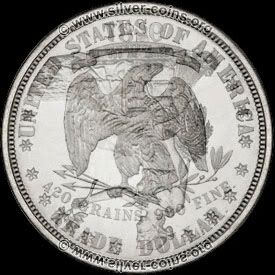
Shouldn't liberty be facing right? I thought that Bob had it wrong, but now I am not sure...
Tkanks,
Dick
_________________
" Deja Moo: The feeling that you've heard this bull before".
|
|
|
|
|
|
DickExpert Member
Posts: 5780
Joined: 21 Sep 2006
Location: Rialto, CA.
|
|
| Posted: Sat Jan 23, 2010 3:51 pm |
|
|
coop, does this pverlay look right? For some reason it doesn't, to me, but I rotated the canvas 180, and then rotated horizontally 180. this should be right, but for some reason, it looks weird.
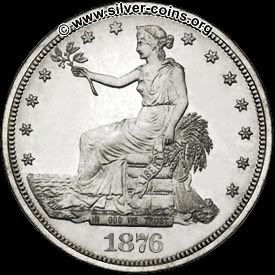
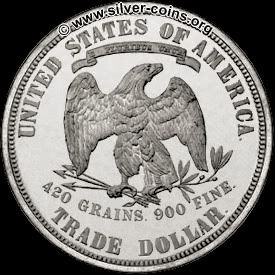
Shouldn't liberty be facing right? I thought that Bob had it wrong, but now I am not sure...I think my overlay is wrong.
Tkanks,
Dick
_________________
" Deja Moo: The feeling that you've heard this bull before".
|
|
|
|
|
|
coopExpert Member
Posts: 3402
Joined: 17 Sep 2003
Location: Arizona
|
|
| Posted: Mon Jan 25, 2010 2:22 pm |
|
|
Correct. They should be rotated 180 degrees and flipped horizontal to be in the same direction as a U.S. Coin would be in normal alignment. The medal alignment would be just the opposite image flipped horizontal and no rotation of the either dies.
_________________
Richard S. Cooper
You may be only one person in the world, but you may also be the world to one person.
|
|
|
|
|
|
DickExpert Member
Posts: 5780
Joined: 21 Sep 2006
Location: Rialto, CA.
|
|
| Posted: Mon Jan 25, 2010 5:47 pm |
|
|
Thanks, Coop. I use the "medal alignment, because i make overlays of the Canadian cents.
on the one that was so dark, I know where that is. it is the small window on the L,H,P,C, etc box.It usually says "Normal,,but I was curious, and checked. Interesting. As I go along, I like to "play with the buttons".
_________________
" Deja Moo: The feeling that you've heard this bull before".
|
|
|
|
|
|
|
|
|
| Page 1 of 1 |
|
|



